> ## Documentation Index
> Fetch the complete documentation index at: https://docs.opper.ai/llms.txt
> Use this file to discover all available pages before exploring further.
# Logs
> Every provider call a project makes, with its model, provider, status, tokens, cost and latency, plus its input and output when a retention rule stores them.
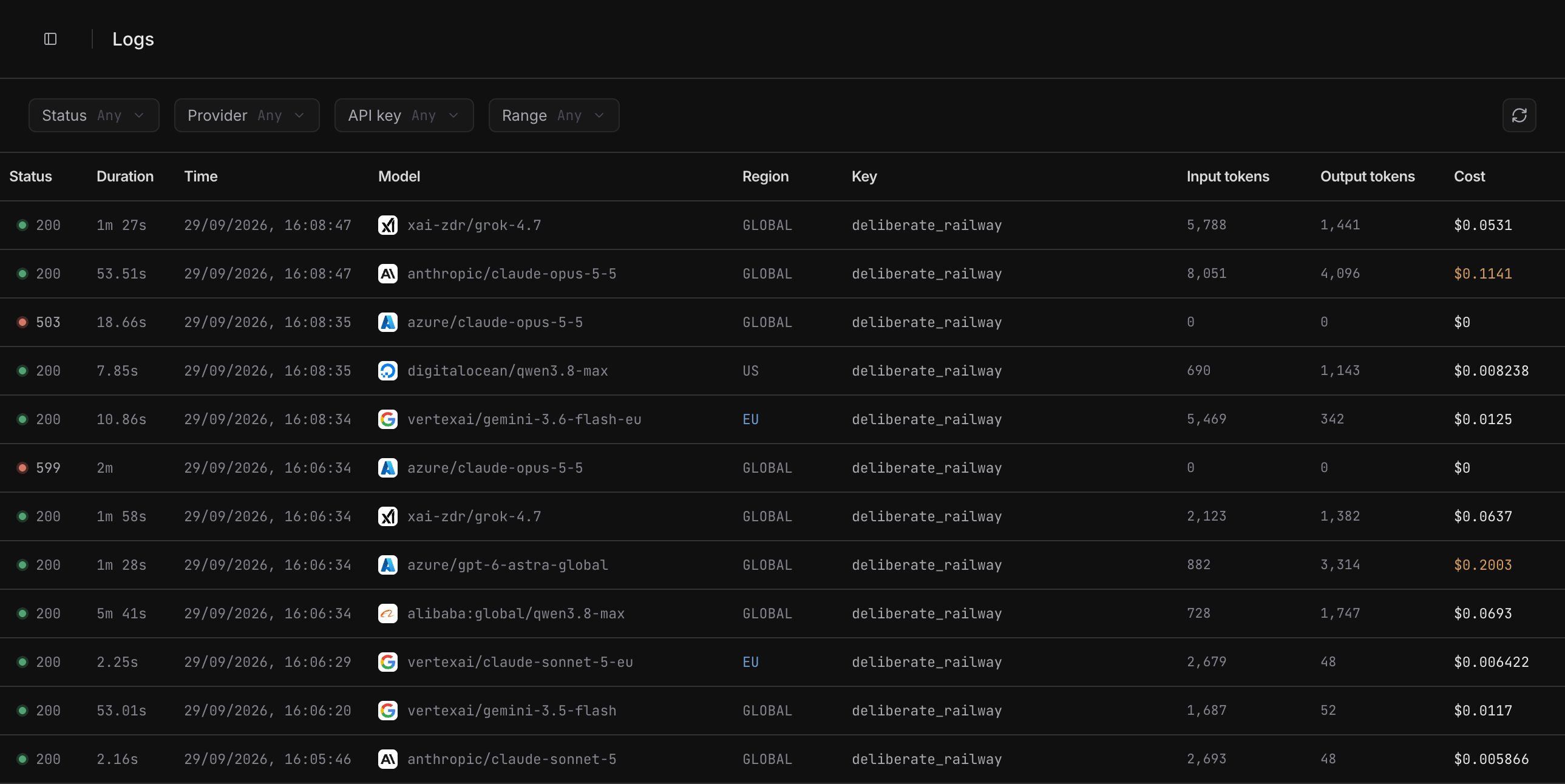
**Logs** lists every call a project makes to a model provider, newest first.
Each row is the usage record Opper writes for every call on every plan, so
Logs works without tracing: it shows which provider served a call, how long
it took, what it cost, and why it failed. A call's input and output appear in
its details when a [retention rule](#inputs-outputs-and-retention) stored
them.
Open a project in [platform.opper.ai](https://platform.opper.ai) and select
**Logs**.
 ## The log list
Each row is one provider call. When Opper retries a call or fails over to
another provider, every attempt gets its own row, so one request can show up
as several (see [Routing](#routing)).
| Column | Shows |
| - | - |
| **Status** | The call's HTTP status, with a dot for how it ended. See [Status](#status). |
| **Duration** | From Opper sending the call to the provider until the whole response was read. |
| **Time** | When the call was made, in your local time. |
| **Model** | The model that ran, beside the mark of the provider that served it. |
| **Region** | Where the serving endpoint runs, such as **EU** or **GLOBAL**. Empty for a call through your own provider key. |
| **Key** | The API key the call came in on. A key that has since been deleted reads **Deleted key**. |
| **Input tokens**, **Output tokens** | Tokens in and out. Hover either one for the full split, including reasoning and cache tokens. |
| **Cost** | What the call cost. Hover it for the breakdown. |
Scroll down to load older calls. The list does not update by itself: select
the refresh button at the right of the filter bar to load new calls. With a
preset range such as **Last hour**, refresh also moves the range up to now.
Press `j` and `k` or the arrow keys to move through the list, `Enter` to open
a log, and `Esc` to close it.
### Filter the list
| Filter | Narrows the list to |
| - | - |
| **Status** | **Success**, **Error** or **Blocked** calls. See [Status](#status). |
| **Provider** | One provider. The menu lists the providers this project's calls went to in the last 90 days. |
| **API key** | Calls made with one of the project's keys. |
| **Range** | **Last hour**, **Last 24 hours**, **Last 7 days**, **Last 30 days**, or days you pick. Without a range, the list goes back through every call the project has made. |
Filters search the project's whole history, or the whole range, not only
the rows already loaded. A combination that matches very few calls can run
out of time before it fills a page; the list then says **These filters took
too long**. Pick a shorter range, or change or clear a filter.
## Log details
Select a row to open its details beside the list, or as a drawer on a narrow
screen. The page URL carries the log's ID (`?log=gen_…`), so you can share a
link that opens the same call.
## The log list
Each row is one provider call. When Opper retries a call or fails over to
another provider, every attempt gets its own row, so one request can show up
as several (see [Routing](#routing)).
| Column | Shows |
| - | - |
| **Status** | The call's HTTP status, with a dot for how it ended. See [Status](#status). |
| **Duration** | From Opper sending the call to the provider until the whole response was read. |
| **Time** | When the call was made, in your local time. |
| **Model** | The model that ran, beside the mark of the provider that served it. |
| **Region** | Where the serving endpoint runs, such as **EU** or **GLOBAL**. Empty for a call through your own provider key. |
| **Key** | The API key the call came in on. A key that has since been deleted reads **Deleted key**. |
| **Input tokens**, **Output tokens** | Tokens in and out. Hover either one for the full split, including reasoning and cache tokens. |
| **Cost** | What the call cost. Hover it for the breakdown. |
Scroll down to load older calls. The list does not update by itself: select
the refresh button at the right of the filter bar to load new calls. With a
preset range such as **Last hour**, refresh also moves the range up to now.
Press `j` and `k` or the arrow keys to move through the list, `Enter` to open
a log, and `Esc` to close it.
### Filter the list
| Filter | Narrows the list to |
| - | - |
| **Status** | **Success**, **Error** or **Blocked** calls. See [Status](#status). |
| **Provider** | One provider. The menu lists the providers this project's calls went to in the last 90 days. |
| **API key** | Calls made with one of the project's keys. |
| **Range** | **Last hour**, **Last 24 hours**, **Last 7 days**, **Last 30 days**, or days you pick. Without a range, the list goes back through every call the project has made. |
Filters search the project's whole history, or the whole range, not only
the rows already loaded. A combination that matches very few calls can run
out of time before it fills a page; the list then says **These filters took
too long**. Pick a shorter range, or change or clear a filter.
## Log details
Select a row to open its details beside the list, or as a drawer on a narrow
screen. The page URL carries the log's ID (`?log=gen_…`), so you can share a
link that opens the same call.
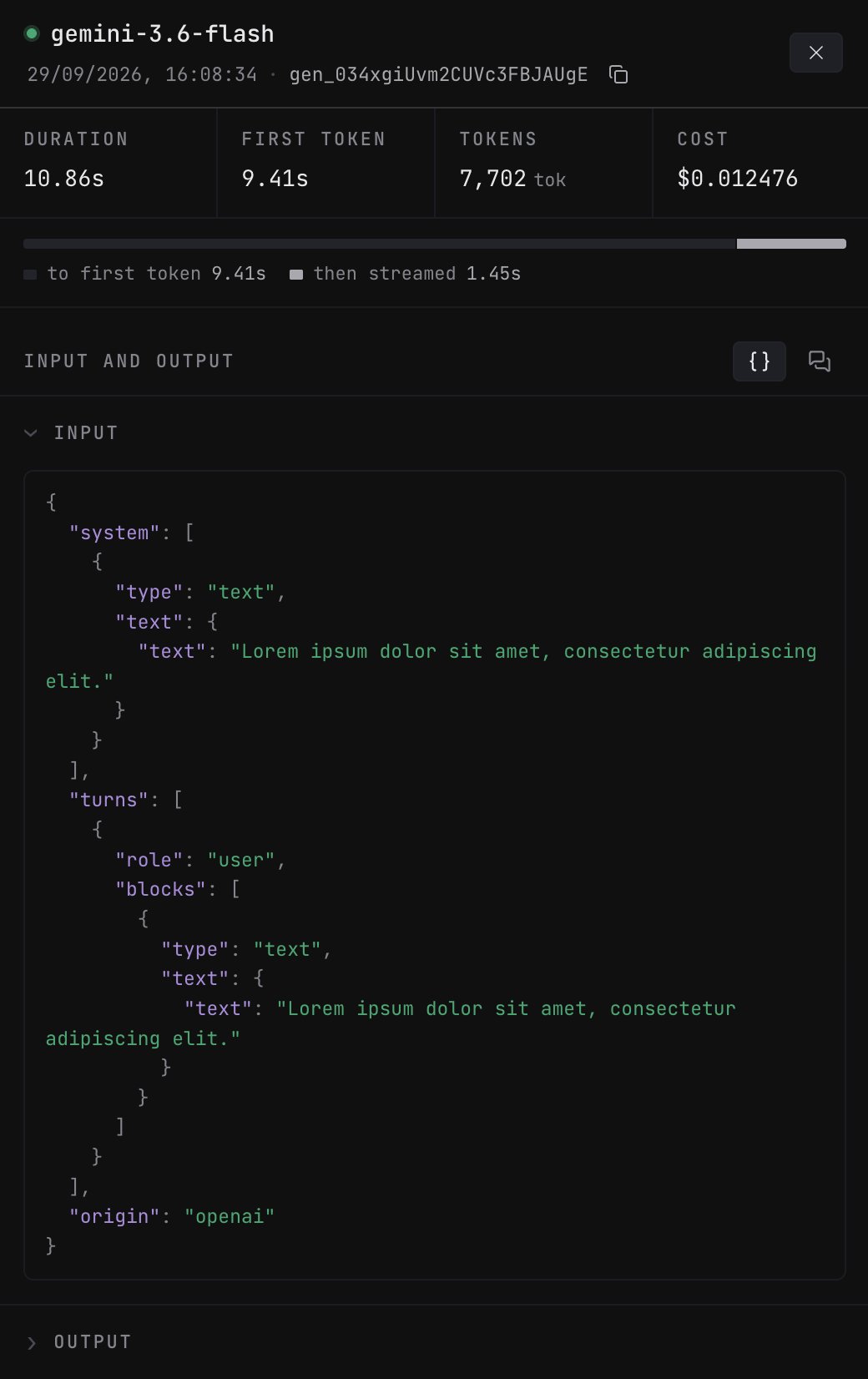 From the top, the details show:
* **The model**, with a status dot, when the call ran, and the log ID. Use
the copy button to copy the ID.
* **Tags** you sent with the call, as `key=value`. See
[Tags & usage attribution](/build/gateway/usage-attribution).
* **Duration**, **First token**, **Tokens** and **Cost**.
* For a streamed call, a bar that splits the duration at the first token:
**to first token**, then **then streamed** for the rest of the response.
* **Input and output**, when they were stored. See
[Inputs, outputs and retention](#inputs-outputs-and-retention).
* **Tokens**: the total, and a bar that splits it into **Input** (cached
reads, uncached input and cache writes) and **Generated** (output, and
reasoning for reasoning models).
* **Routing**: which endpoint served the call, and why. See
[Routing](#routing).
* **Technical details**, below.
From the top, the details show:
* **The model**, with a status dot, when the call ran, and the log ID. Use
the copy button to copy the ID.
* **Tags** you sent with the call, as `key=value`. See
[Tags & usage attribution](/build/gateway/usage-attribution).
* **Duration**, **First token**, **Tokens** and **Cost**.
* For a streamed call, a bar that splits the duration at the first token:
**to first token**, then **then streamed** for the rest of the response.
* **Input and output**, when they were stored. See
[Inputs, outputs and retention](#inputs-outputs-and-retention).
* **Tokens**: the total, and a bar that splits it into **Input** (cached
reads, uncached input and cache writes) and **Generated** (output, and
reasoning for reasoning models).
* **Routing**: which endpoint served the call, and why. See
[Routing](#routing).
* **Technical details**, below.
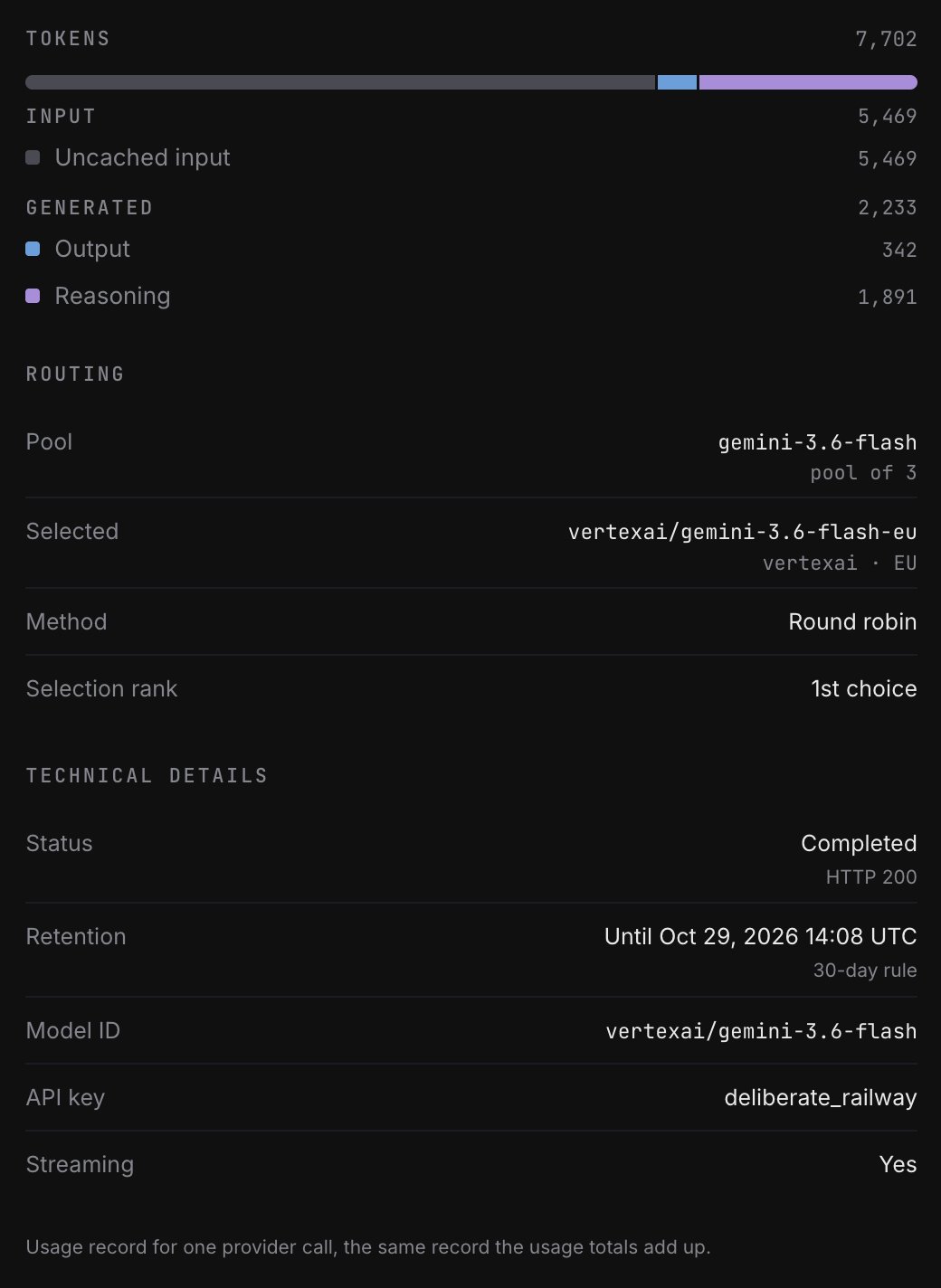 | Technical detail | Shows |
| - | - |
| **Status** | How the call ended, with its HTTP status. |
| **Retention** | Until when the call's input and output are kept, and under which rule. See [What each log shows](#what-each-log-shows). |
| **Model ID** | The exact model ID the provider was called with, such as `bedrock/eu.anthropic.claude-opus-5-5`. |
| **API key** | The key the call came in on. |
| **Session** | The session ID, for a call made through a [URL session prefix](/build/gateway/usage-attribution#tag-with-the-url). |
| **Capability** | The kind of call, shown when it is not a text completion. |
| **Streaming** | Whether the response was streamed. |
| **Refusal** | The refusal code, for a call Opper blocked. |
### Status
The list shows each call's HTTP status. The details spell out what it means,
and the **Status** filter groups calls into three outcomes.
| Details say | When | Status filter |
| - | - | - |
| **Completed** | The call succeeded (below 400). | Success |
| **Rate limited by provider** | The provider answered 429. | Error |
| **Client closed the connection** | Your client disconnected before the response finished (499). | Error |
| **No response from provider** | The provider never answered (599). | Error |
| **Provider error** | The provider failed with another 5xx status. | Error |
| **Rejected by provider** | The provider refused the request with another 4xx status. | Error |
| **Blocked by your rules** | Opper refused the call under your [Rules](/control-plane/rules/overview) before any provider saw it. | Blocked |
| **Agreement required** | The route needs an [agreement](/control-plane/rules/model-access#routes-that-require-an-agreement) your organization does not have. | Blocked |
A blocked call never reached a provider, so it has no output. Its
**Refusal** row shows the refusal code.
### Routing
When a call names a bare model, such as `claude-opus-5-5` rather than
`aws/claude-opus-5-5`, a [model pool](/control-plane/rules/routing) serves
it, and **Routing** explains how the pool placed the call:
| Row | Shows |
| - | - |
| **Pool** | The model name the pool serves, and how many providers it held for this call. |
| **Selected** | The endpoint that served the call, with its provider and region. |
| **Method** | What put the first provider first. |
| **Selection rank** | Where this attempt sat in the order: **1st choice**, or **2nd choice** and so on after the providers ahead of it failed. |
| **Cut off** | **No first token before the deadline** when Opper gave up waiting for this attempt and moved on. |
**Method** is one of:
| Method | Meaning |
| - | - |
| **Your pool order** | Your [routing rule](/control-plane/rules/routing) ranked the pool, for example **Your pool order: Cheapest first**. |
| **Session affinity** | The provider that served this session before went first, ahead of any pool order. |
| **Your BYOK key** | A provider you hold your [own key](/capabilities/custom-models) for went first. |
| **Round robin** | No routing rule applied, your rule is set to round robin, or it had no numbers yet to rank on. |
| **Only member** | The pool had one provider to choose from. |
A call that fails over leaves a row for each attempt: the failed attempts
first, then the one that answered, with a **Selection rank** of 2nd choice or
later. A provider retried after a 429 or 5xx writes a second row at the same
rank.
A call that names a specific provider's model, and a response served from
cache, show only **Selected**. So do calls made before Opper started recording
pool placement, so a missing **Pool** row does not mean the call was pinned.
## Inputs, outputs and retention
Logs holds two kinds of data, kept for different lengths of time:
* **The usage record**: everything in the list and the details except the
input and output. Opper writes it for every call on every plan, including
when retention is off, and keeps it for 5 years. It contains no prompts or
responses.
* **The input and output**: stored only when a
[retention rule](/control-plane/rules/retention) covers the call's project,
kept for that rule's period of 1 to 30 days, then deleted.
| | Gateway | Control Plane and Enterprise |
| - | - | - |
| Every call in Logs, with model, provider, status, tokens, cost, latency, routing and tags | Yes | Yes |
| Each call's input and output | Not stored | Stored for 1 to 30 days while retention is on |
### Keep inputs and outputs with Control Plane
Retention rules are a Control Plane feature. On the Gateway plan, every call
still appears in Logs with its full usage record, but its input and output
are never stored. In their place, each log's **Input and output** section
explains what Control Plane keeps, with an **Upgrade to Control Plane**
button.
| Technical detail | Shows |
| - | - |
| **Status** | How the call ended, with its HTTP status. |
| **Retention** | Until when the call's input and output are kept, and under which rule. See [What each log shows](#what-each-log-shows). |
| **Model ID** | The exact model ID the provider was called with, such as `bedrock/eu.anthropic.claude-opus-5-5`. |
| **API key** | The key the call came in on. |
| **Session** | The session ID, for a call made through a [URL session prefix](/build/gateway/usage-attribution#tag-with-the-url). |
| **Capability** | The kind of call, shown when it is not a text completion. |
| **Streaming** | Whether the response was streamed. |
| **Refusal** | The refusal code, for a call Opper blocked. |
### Status
The list shows each call's HTTP status. The details spell out what it means,
and the **Status** filter groups calls into three outcomes.
| Details say | When | Status filter |
| - | - | - |
| **Completed** | The call succeeded (below 400). | Success |
| **Rate limited by provider** | The provider answered 429. | Error |
| **Client closed the connection** | Your client disconnected before the response finished (499). | Error |
| **No response from provider** | The provider never answered (599). | Error |
| **Provider error** | The provider failed with another 5xx status. | Error |
| **Rejected by provider** | The provider refused the request with another 4xx status. | Error |
| **Blocked by your rules** | Opper refused the call under your [Rules](/control-plane/rules/overview) before any provider saw it. | Blocked |
| **Agreement required** | The route needs an [agreement](/control-plane/rules/model-access#routes-that-require-an-agreement) your organization does not have. | Blocked |
A blocked call never reached a provider, so it has no output. Its
**Refusal** row shows the refusal code.
### Routing
When a call names a bare model, such as `claude-opus-5-5` rather than
`aws/claude-opus-5-5`, a [model pool](/control-plane/rules/routing) serves
it, and **Routing** explains how the pool placed the call:
| Row | Shows |
| - | - |
| **Pool** | The model name the pool serves, and how many providers it held for this call. |
| **Selected** | The endpoint that served the call, with its provider and region. |
| **Method** | What put the first provider first. |
| **Selection rank** | Where this attempt sat in the order: **1st choice**, or **2nd choice** and so on after the providers ahead of it failed. |
| **Cut off** | **No first token before the deadline** when Opper gave up waiting for this attempt and moved on. |
**Method** is one of:
| Method | Meaning |
| - | - |
| **Your pool order** | Your [routing rule](/control-plane/rules/routing) ranked the pool, for example **Your pool order: Cheapest first**. |
| **Session affinity** | The provider that served this session before went first, ahead of any pool order. |
| **Your BYOK key** | A provider you hold your [own key](/capabilities/custom-models) for went first. |
| **Round robin** | No routing rule applied, your rule is set to round robin, or it had no numbers yet to rank on. |
| **Only member** | The pool had one provider to choose from. |
A call that fails over leaves a row for each attempt: the failed attempts
first, then the one that answered, with a **Selection rank** of 2nd choice or
later. A provider retried after a 429 or 5xx writes a second row at the same
rank.
A call that names a specific provider's model, and a response served from
cache, show only **Selected**. So do calls made before Opper started recording
pool placement, so a missing **Pool** row does not mean the call was pinned.
## Inputs, outputs and retention
Logs holds two kinds of data, kept for different lengths of time:
* **The usage record**: everything in the list and the details except the
input and output. Opper writes it for every call on every plan, including
when retention is off, and keeps it for 5 years. It contains no prompts or
responses.
* **The input and output**: stored only when a
[retention rule](/control-plane/rules/retention) covers the call's project,
kept for that rule's period of 1 to 30 days, then deleted.
| | Gateway | Control Plane and Enterprise |
| - | - | - |
| Every call in Logs, with model, provider, status, tokens, cost, latency, routing and tags | Yes | Yes |
| Each call's input and output | Not stored | Stored for 1 to 30 days while retention is on |
### Keep inputs and outputs with Control Plane
Retention rules are a Control Plane feature. On the Gateway plan, every call
still appears in Logs with its full usage record, but its input and output
are never stored. In their place, each log's **Input and output** section
explains what Control Plane keeps, with an **Upgrade to Control Plane**
button.
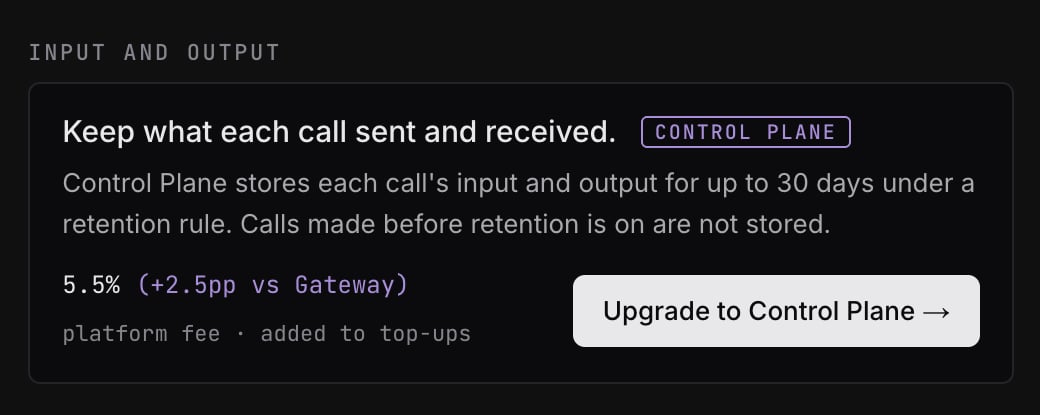 To see what your application actually sent and received, upgrade to
[Control Plane](https://opper.ai/pricing), then turn on
[Opper retention](/control-plane/rules/retention). Each new call's input and
output then appear in Logs, and in [Traces](/control-plane/trace), for up to
30 days.
On Control Plane with retention off for the project, the same section shows a
**Turn on retention** button that opens **Opper retention** in Rules.
### Retention counts from when the call was made
Whether a call's input and output were stored is decided when the call runs,
by the retention rule in effect then, and recorded on its log. Changing the
rule later does not change what a call already has:
* **Turning retention on** stores calls made after you save. Earlier calls
stay **Not stored**.
* **Turning retention off, shortening it, or moving to Gateway** deletes
nothing early. Stored inputs and outputs stay until the expiry they got when
the call was made, and the **Retention** row adds **off now for new calls**.
### What each log shows
| You see | Why |
| - | - |
| The input and output, and **Retention: Until** a date | Stored under the rule named beside it, such as **30-day rule**, until that date (UTC). |
| **Keep what each call sent and received**, with **Upgrade to Control Plane** | The organization is on Gateway, which does not store inputs and outputs. |
| **Turn on retention** as a button | The organization is on Control Plane, but no retention rule stores this project's calls. |
| **Not stored. Retention was off when this call was made.** | Retention is on now, but was not for this call. |
| **A zero data retention rule covers this project** | A [zero data retention](/control-plane/rules/retention#existing-zero-data-retention-rules) rule applies, so nothing is stored by design. |
| **Stored under a 7-day retention rule and deleted on** a date | The input and output were stored, and their retention period has ended. |
### How inputs and outputs are shown
* Messages render as a chat. Use the `{}` toggle to see the raw JSON; a call
with no chat shape always shows JSON.
* A failed call shows its error text above the input.
* Images, audio and files sent inline are replaced with a placeholder; the
media itself is not shown.
* An input or output over 1 MB is cut to its first 1 MB and marked
**Shortened**.
* A blocked call has no output, since it never reached a provider.
## Logs and traces
Logs and [Traces](/control-plane/trace) answer different questions:
| | Logs | Traces |
| - | - | - |
| A row is | One provider call | One request, as a tree of spans |
| Available on | Every plan | Control Plane, with retention on |
| Without retention | Every call, with its usage record | Nothing is recorded |
| Shows | Provider, routing, status, tokens and cost for each attempt | Nested LLM calls, tool calls, custom spans and rule activity |
| Input and output | While a retention rule keeps them | While a retention rule keeps them |
Use Logs to find a call by provider, key or outcome, and Traces to follow
everything a request did. Both read the same stored input and output, under
the same retention rule.
## Where to go next
Turn on retention so new calls keep their input and output.
Follow a request through its model calls, tool calls and rules.
Tag calls so they are easy to find in Logs and to attribute in Usage.
Choose which provider a model pool tries first.
To see what your application actually sent and received, upgrade to
[Control Plane](https://opper.ai/pricing), then turn on
[Opper retention](/control-plane/rules/retention). Each new call's input and
output then appear in Logs, and in [Traces](/control-plane/trace), for up to
30 days.
On Control Plane with retention off for the project, the same section shows a
**Turn on retention** button that opens **Opper retention** in Rules.
### Retention counts from when the call was made
Whether a call's input and output were stored is decided when the call runs,
by the retention rule in effect then, and recorded on its log. Changing the
rule later does not change what a call already has:
* **Turning retention on** stores calls made after you save. Earlier calls
stay **Not stored**.
* **Turning retention off, shortening it, or moving to Gateway** deletes
nothing early. Stored inputs and outputs stay until the expiry they got when
the call was made, and the **Retention** row adds **off now for new calls**.
### What each log shows
| You see | Why |
| - | - |
| The input and output, and **Retention: Until** a date | Stored under the rule named beside it, such as **30-day rule**, until that date (UTC). |
| **Keep what each call sent and received**, with **Upgrade to Control Plane** | The organization is on Gateway, which does not store inputs and outputs. |
| **Turn on retention** as a button | The organization is on Control Plane, but no retention rule stores this project's calls. |
| **Not stored. Retention was off when this call was made.** | Retention is on now, but was not for this call. |
| **A zero data retention rule covers this project** | A [zero data retention](/control-plane/rules/retention#existing-zero-data-retention-rules) rule applies, so nothing is stored by design. |
| **Stored under a 7-day retention rule and deleted on** a date | The input and output were stored, and their retention period has ended. |
### How inputs and outputs are shown
* Messages render as a chat. Use the `{}` toggle to see the raw JSON; a call
with no chat shape always shows JSON.
* A failed call shows its error text above the input.
* Images, audio and files sent inline are replaced with a placeholder; the
media itself is not shown.
* An input or output over 1 MB is cut to its first 1 MB and marked
**Shortened**.
* A blocked call has no output, since it never reached a provider.
## Logs and traces
Logs and [Traces](/control-plane/trace) answer different questions:
| | Logs | Traces |
| - | - | - |
| A row is | One provider call | One request, as a tree of spans |
| Available on | Every plan | Control Plane, with retention on |
| Without retention | Every call, with its usage record | Nothing is recorded |
| Shows | Provider, routing, status, tokens and cost for each attempt | Nested LLM calls, tool calls, custom spans and rule activity |
| Input and output | While a retention rule keeps them | While a retention rule keeps them |
Use Logs to find a call by provider, key or outcome, and Traces to follow
everything a request did. Both read the same stored input and output, under
the same retention rule.
## Where to go next
Turn on retention so new calls keep their input and output.
Follow a request through its model calls, tool calls and rules.
Tag calls so they are easy to find in Logs and to attribute in Usage.
Choose which provider a model pool tries first.