> ## Documentation Index
> Fetch the complete documentation index at: https://docs.opper.ai/llms.txt
> Use this file to discover all available pages before exploring further.
# Checks
> Score quality or flag, redact, and block content in model calls.
Checks inspect model inputs and outputs. Use them to measure response quality,
detect policy violations, remove sensitive data, or stop unsafe content before
it continues through your application.
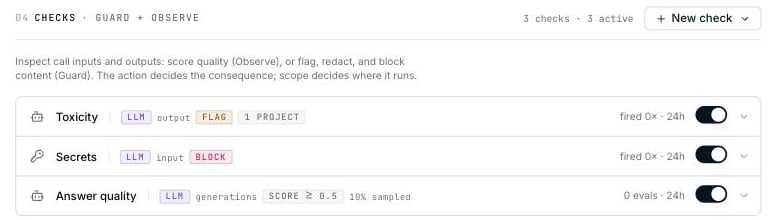 Each row shows what the check reads, the engine it uses, the action it takes,
its scope, and its activity over the last 24 hours.
## Start from a template
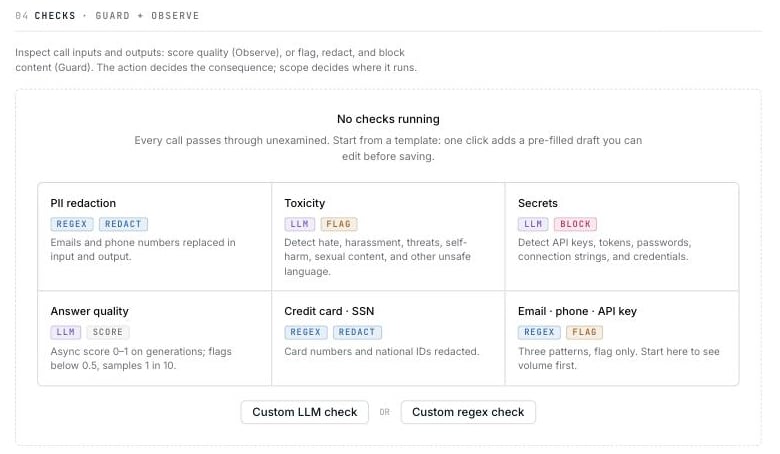
When you have no checks, Rules shows a gallery of common starting points. Select
a template to add a pre-filled draft, then review it before saving.
Each row shows what the check reads, the engine it uses, the action it takes,
its scope, and its activity over the last 24 hours.
## Start from a template
When you have no checks, Rules shows a gallery of common starting points. Select
a template to add a pre-filled draft, then review it before saving.
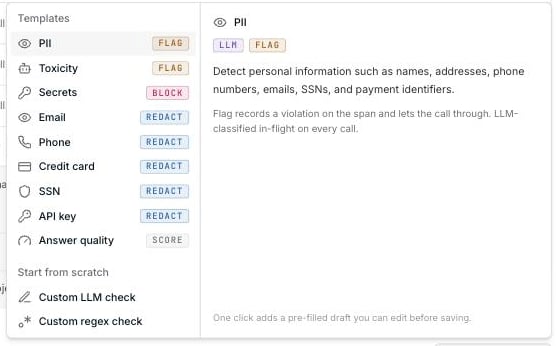
 After you save your first check, open **New check** to find the same templates
and custom options.
After you save your first check, open **New check** to find the same templates
and custom options.
 | Starting point | Engine | Default action |
| --------------------------------------- | ------ | -------------- |
| PII | LLM | Flag |
| Toxicity | LLM | Flag |
| Secrets | LLM | Block |
| Email, phone, credit card, SSN, API key | Regex | Redact |
| Answer quality | LLM | Score |
| Custom LLM check | LLM | Flag |
| Custom regex check | Regex | Redact |
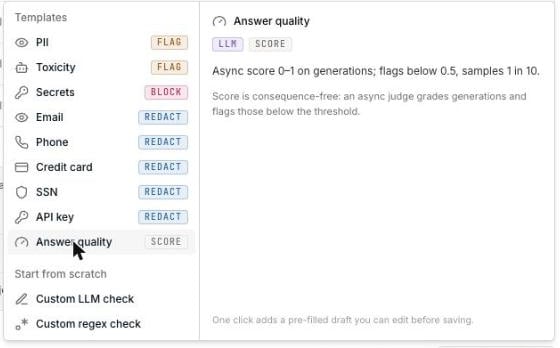
The description pane explains what each template detects and what its default
action will do.
| Starting point | Engine | Default action |
| --------------------------------------- | ------ | -------------- |
| PII | LLM | Flag |
| Toxicity | LLM | Flag |
| Secrets | LLM | Block |
| Email, phone, credit card, SSN, API key | Regex | Redact |
| Answer quality | LLM | Score |
| Custom LLM check | LLM | Flag |
| Custom regex check | Regex | Redact |
The description pane explains what each template detects and what its default
action will do.
 ## Choose an action
The action determines when a check runs and whether it can change the call.
| Action | Result | When it runs |
| ---------- | ------------------------------------------------------------------------------------------- | --------------- |
| **Score** | Grades a stored output and flags scores below the threshold. It never changes the response. | After the call |
| **Flag** | Records a violation and allows the call to continue. | During the call |
| **Redact** | Replaces matching content before the call continues. | During the call |
| **Block** | Rejects the call with an error. | During the call |
Score checks are stored and run differently from enforcement checks. Changing a
saved check between **Score** and another action creates a new check, so its
previous activity history is not carried over.
## Choose an engine
### LLM checks
Use an LLM check when the rule depends on meaning or context—for example tone,
intent, toxicity, or whether an answer addressed the question.
## Choose an action
The action determines when a check runs and whether it can change the call.
| Action | Result | When it runs |
| ---------- | ------------------------------------------------------------------------------------------- | --------------- |
| **Score** | Grades a stored output and flags scores below the threshold. It never changes the response. | After the call |
| **Flag** | Records a violation and allows the call to continue. | During the call |
| **Redact** | Replaces matching content before the call continues. | During the call |
| **Block** | Rejects the call with an error. | During the call |
Score checks are stored and run differently from enforcement checks. Changing a
saved check between **Score** and another action creates a new check, so its
previous activity history is not carried over.
## Choose an engine
### LLM checks
Use an LLM check when the rule depends on meaning or context—for example tone,
intent, toxicity, or whether an answer addressed the question.
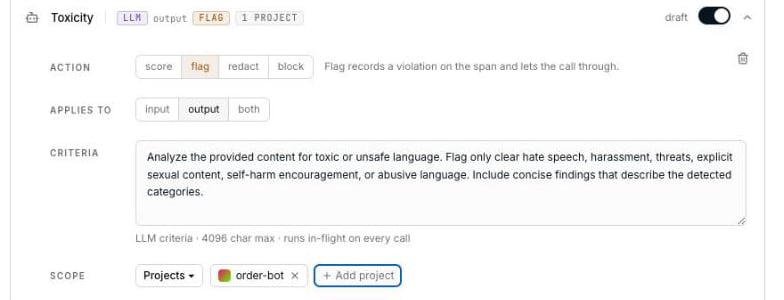 | Field | What to configure |
| -------------- | --------------------------------------------------------------------------------------------------------------------------------- |
| **Applies to** | Input, output, or both. |
| **Criteria** | Instructions for the classifier, up to 4,096 characters. Required for Flag, Redact, and Block. Score has separate criteria rules. |
| **Scope** | The whole organization or selected projects. |
Opper chooses and manages the classifier model. LLM checks use a failover chain
and are billed at a flat rate for checks, regardless of which model handles the
request.
LLM checks fail open. If the classifier is unavailable or returns an invalid
result, Opper skips the check and allows the model call to continue. The failure
is recorded on the trace when trace storage is enabled.
### Regex checks
Use a regex check for predictable formats such as email addresses, credit card
numbers, SSNs, and API keys. Regex checks do not call a model and cannot use the
Score action.
| Field | What to configure |
| -------------- | --------------------------------------------------------------------------------------------------------------------------------- |
| **Applies to** | Input, output, or both. |
| **Criteria** | Instructions for the classifier, up to 4,096 characters. Required for Flag, Redact, and Block. Score has separate criteria rules. |
| **Scope** | The whole organization or selected projects. |
Opper chooses and manages the classifier model. LLM checks use a failover chain
and are billed at a flat rate for checks, regardless of which model handles the
request.
LLM checks fail open. If the classifier is unavailable or returns an invalid
result, Opper skips the check and allows the model call to continue. The failure
is recorded on the trace when trace storage is enabled.
### Regex checks
Use a regex check for predictable formats such as email addresses, credit card
numbers, SSNs, and API keys. Regex checks do not call a model and cannot use the
Score action.
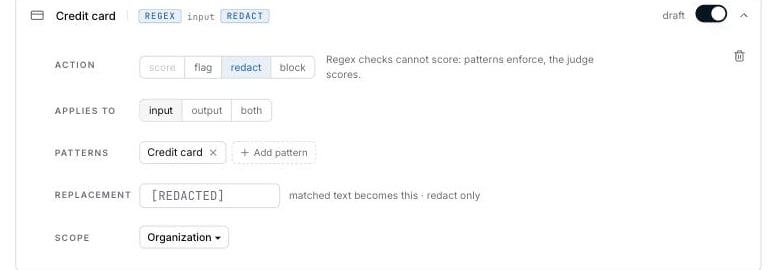 Select a pattern chip to edit and test it.
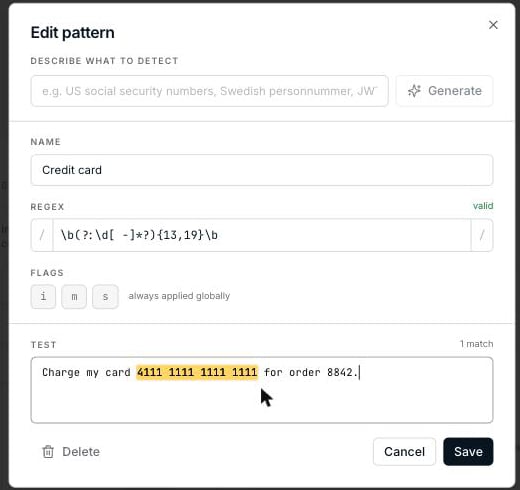 | Field | What to configure |
| --------------------------- | --------------------------------------------------------------------------------------------------- |
| **Describe what to detect** | Optionally describe the pattern in plain language, then select **Generate** for a first draft. |
| **Name** | The label shown in the check summary. |
| **Regex** | The expression to match. Syntax is validated as you type. |
| **Flags** | `i` for case-insensitive, `m` for multiline, and `s` for dotall. Global matching is always enabled. |
| **Test** | Sample content used to highlight and count matches before you save. |
Test the pattern with examples that should match and examples that should not.
### Redaction behavior
When the action is **Redact**, a regex check replaces each match with `***` by
default. An LLM check uses `[REDACTED]`. Enter a replacement value if you want a
different result.
If an LLM check detects a violation but cannot identify the exact text to
replace, Opper flags the call instead of changing its content. This can happen
with broad findings such as toxicity.
## Score checks
Choose **Score** to evaluate response quality after a call completes.
| Field | What to configure |
| --------------------------- | --------------------------------------------------------------------------------------------------- |
| **Describe what to detect** | Optionally describe the pattern in plain language, then select **Generate** for a first draft. |
| **Name** | The label shown in the check summary. |
| **Regex** | The expression to match. Syntax is validated as you type. |
| **Flags** | `i` for case-insensitive, `m` for multiline, and `s` for dotall. Global matching is always enabled. |
| **Test** | Sample content used to highlight and count matches before you save. |
Test the pattern with examples that should match and examples that should not.
### Redaction behavior
When the action is **Redact**, a regex check replaces each match with `***` by
default. An LLM check uses `[REDACTED]`. Enter a replacement value if you want a
different result.
If an LLM check detects a violation but cannot identify the exact text to
replace, Opper flags the call instead of changing its content. This can happen
with broad findings such as toxicity.
## Score checks
Choose **Score** to evaluate response quality after a call completes.
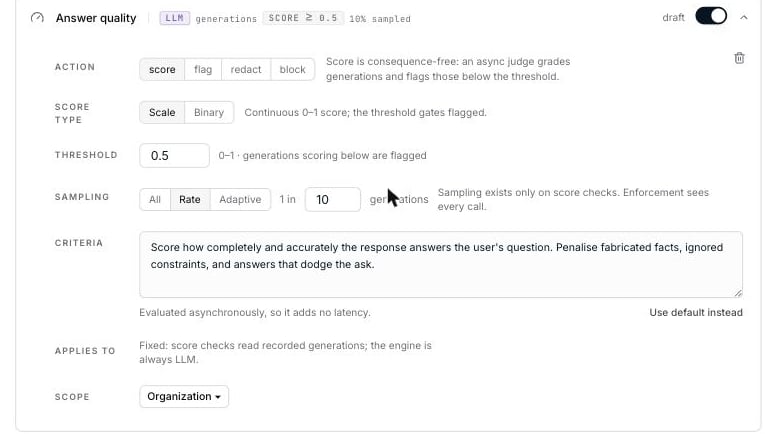 ### Score type
| Type | Result |
| ---------- | --------------------------------------------------------------------------------------------------------------------------------------------------------- |
| **Scale** | Returns a value from 0 to 1 and flags results below your threshold. Criteria are optional; without them, the judge performs a general quality evaluation. |
| **Binary** | Returns 0 or 1 and flags a result of 0. Criteria are required. |
### Sampling
Sampling controls how many outputs the judge evaluates and therefore how
much the check costs.
| Strategy | Behavior |
| ------------ | -------------------------------------------------------------------------------------------------------------------------- |
| **All** | Evaluate every output. |
| **Rate** | Evaluate 1 in every *N* outputs. New checks default to 1 in 10. |
| **Adaptive** | Evaluate every output up to a limit per 1-hour or 24-hour window, then gradually reduce the sampling rate as volume grows. |
Adaptive sampling keeps evaluation costs more predictable during traffic
spikes. If its counter is unavailable, Opper evaluates every output rather
than silently skipping them.
Score checks need stored outputs. They do not run when retention is unset,
set to 0 days, or when Zero Data Retention is enabled. See
[Data retention](/control-plane/rules/retention).
The judge model is managed by Opper and billed at the same flat rate for checks.
Disabling a score check stops queued evaluations before the next judge call
begins.
## Set the scope
Run a check across the organization or limit it to selected projects.
| Scope | Applies to |
| ---------------- | ----------------------------- |
| **Organization** | Every project. |
| **Projects** | Only the projects you select. |
If you choose **Projects**, select at least one project before saving.
## When checks overlap
Every matching check runs; there is no priority order. If several checks apply
to the same call, the strictest result wins. One blocking result is enough to
reject the call.
Rules highlights checks with the same name and overlapping scope so you can
confirm that the overlap is intentional.
Opper evaluates up to **32 checks per request**, counting input and output
together. Any additional checks are skipped.
## Disable a check or review activity
Use a row's toggle to stop a saved check without deleting its configuration.
Disabled checks stop immediately and are excluded from validation until you
enable them again.
The activity label covers the last 24 hours:
| Label | Meaning |
| --------------------- | ---------------------------------------------------- |
| `draft` | Added but not yet saved |
| `off` | Saved but disabled |
| `N matches · 24h` | Number of matches for a Flag, Redact, or Block check |
| `N evaluations · 24h` | Number of outputs evaluated by a Score check |
Start a new enforcement check with **Flag**. Review its matches before switching
to **Block** or **Redact**. For LLM checks, changing the action does not change
the price—the same classifier runs either way.
### Score type
| Type | Result |
| ---------- | --------------------------------------------------------------------------------------------------------------------------------------------------------- |
| **Scale** | Returns a value from 0 to 1 and flags results below your threshold. Criteria are optional; without them, the judge performs a general quality evaluation. |
| **Binary** | Returns 0 or 1 and flags a result of 0. Criteria are required. |
### Sampling
Sampling controls how many outputs the judge evaluates and therefore how
much the check costs.
| Strategy | Behavior |
| ------------ | -------------------------------------------------------------------------------------------------------------------------- |
| **All** | Evaluate every output. |
| **Rate** | Evaluate 1 in every *N* outputs. New checks default to 1 in 10. |
| **Adaptive** | Evaluate every output up to a limit per 1-hour or 24-hour window, then gradually reduce the sampling rate as volume grows. |
Adaptive sampling keeps evaluation costs more predictable during traffic
spikes. If its counter is unavailable, Opper evaluates every output rather
than silently skipping them.
Score checks need stored outputs. They do not run when retention is unset,
set to 0 days, or when Zero Data Retention is enabled. See
[Data retention](/control-plane/rules/retention).
The judge model is managed by Opper and billed at the same flat rate for checks.
Disabling a score check stops queued evaluations before the next judge call
begins.
## Set the scope
Run a check across the organization or limit it to selected projects.
| Scope | Applies to |
| ---------------- | ----------------------------- |
| **Organization** | Every project. |
| **Projects** | Only the projects you select. |
If you choose **Projects**, select at least one project before saving.
## When checks overlap
Every matching check runs; there is no priority order. If several checks apply
to the same call, the strictest result wins. One blocking result is enough to
reject the call.
Rules highlights checks with the same name and overlapping scope so you can
confirm that the overlap is intentional.
Opper evaluates up to **32 checks per request**, counting input and output
together. Any additional checks are skipped.
## Disable a check or review activity
Use a row's toggle to stop a saved check without deleting its configuration.
Disabled checks stop immediately and are excluded from validation until you
enable them again.
The activity label covers the last 24 hours:
| Label | Meaning |
| --------------------- | ---------------------------------------------------- |
| `draft` | Added but not yet saved |
| `off` | Saved but disabled |
| `N matches · 24h` | Number of matches for a Flag, Redact, or Block check |
| `N evaluations · 24h` | Number of outputs evaluated by a Score check |
Start a new enforcement check with **Flag**. Review its matches before switching
to **Block** or **Redact**. For LLM checks, changing the action does not change
the price—the same classifier runs either way.