Understanding the execution loop helps you design better agents and debug issues. This page explains what happens when you call agent.process().

The Think-Act Loop

Agents follow a loop pattern:
  1. Think: LLM analyzes the goal and decides what to do
  2. Act: Execute selected tools
  3. Observe: Process tool results
  4. Decide: Continue looping or return result
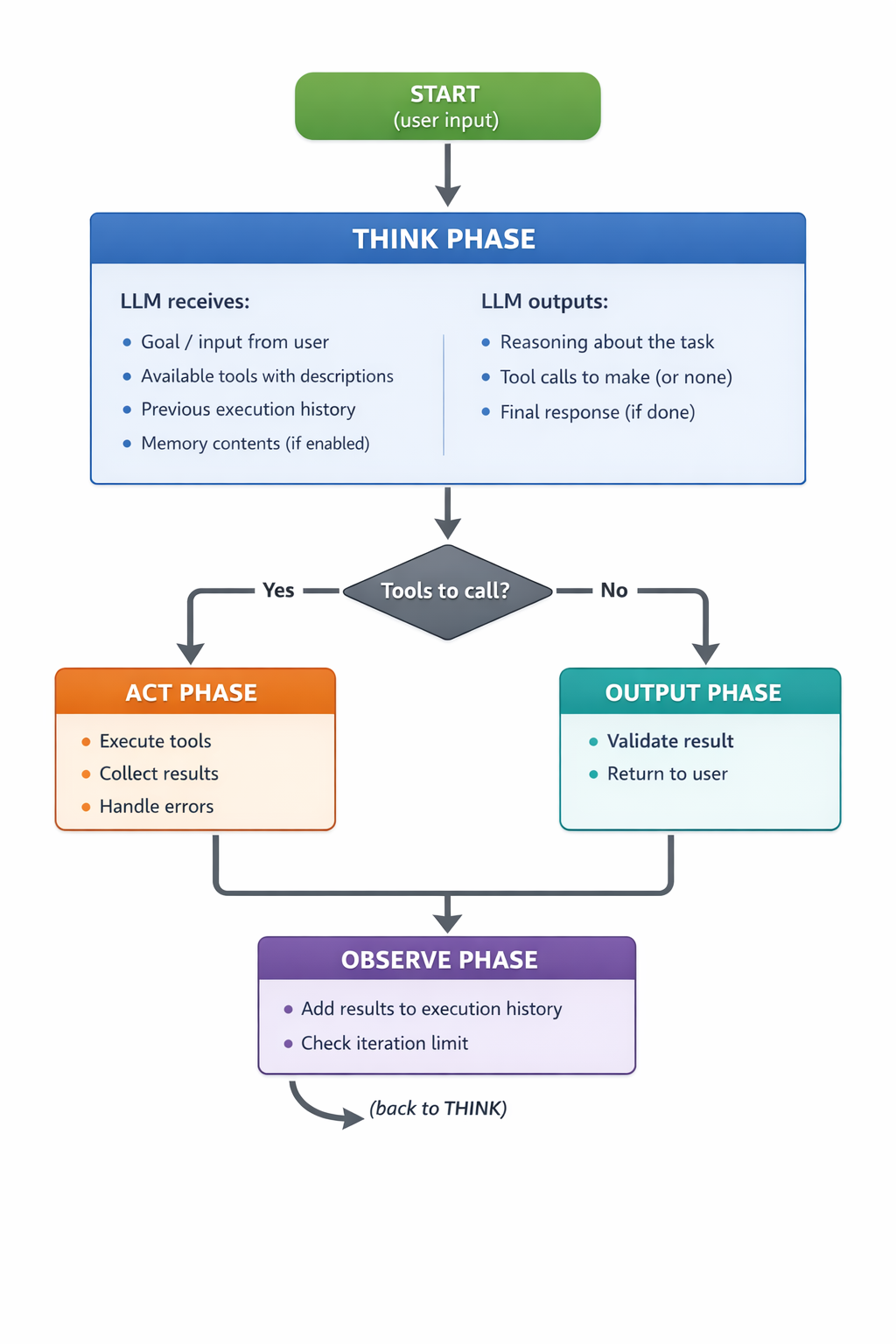
Execution Phases

1. Think Phase

The LLM receives a structured prompt containing:
  • The user’s goal/input
  • Descriptions of all available tools
  • History of previous iterations (if any)
  • Memory contents (if memory is enabled)
It responds with a “thought” that includes:
  • Reasoning about what to do next
  • Which tools to call (with arguments)
  • A final answer (if ready to complete)

2. Act Phase

When tools are selected, the agent:
  1. Validates tool arguments against schemas
  2. Executes each tool (in parallel when possible)
  3. Captures results or errors
  4. Records execution time

3. Observe Phase

After tools execute:
  1. Results are added to the execution history
  2. The iteration counter increments
  3. The loop continues back to Think

4. Output Phase

When the LLM decides it’s done (no more tools to call):
  1. The final response is extracted
  2. Output is validated against the output schema (if defined)
  3. Result is returned to the caller

Execution History

Each iteration adds a cycle to the history:
# Accessing execution history via hooks
from opper_agents import hook
from opper_agents.base.context import AgentContext

@hook("agent_end")
async def on_end(context: AgentContext, agent, **kwargs):
    for cycle in context.execution_history:
        print(f"Iteration {cycle.iteration}:")
        print(f"  Thought: {cycle.thought}")
        print(f"  Tools called: {len(cycle.tool_calls)}")
        for tool_call in cycle.tool_calls:
            print(f"    - {tool_call.name}: {tool_call.result}")

Iteration Limits

The max_iterations parameter prevents infinite loops:
agent = Agent(
    name="MyAgent",
    max_iterations=10  # Default is 25
)
When the limit is reached:
  • The agent stops iterating
  • It returns the best result it has
  • A warning may be logged

Token Usage

Each iteration consumes tokens:
from opper_agents import hook
from opper_agents.base.context import AgentContext

@hook("agent_end")
async def track_usage(context: AgentContext, agent, **kwargs):
    usage = context.usage
    print(f"Requests: {usage.requests}")
    print(f"Input tokens: {usage.input_tokens}")
    print(f"Output tokens: {usage.output_tokens}")
    print(f"Total tokens: {usage.total_tokens}")
    print(f"Cost: ${usage.cost.total:.4f}")

Tracing with Spans

Each agent execution creates a trace with spans:
Agent Execution (root span)
├── Think (iteration 1)
│   └── LLM Call
├── Tool: search
├── Tool: analyze
├── Think (iteration 2)
│   └── LLM Call
└── Output Validation
View traces in the Opper Dashboard for detailed debugging.

Error Handling

Tool Errors

When a tool throws an error:
  1. The error is caught and recorded
  2. The error message is sent to the LLM
  3. The LLM can decide to retry or try a different approach
@tool
def risky_operation(input: str) -> str:
    """An operation that might fail."""
    if not input:
        raise ValueError("Input cannot be empty")
    return f"Processed: {input}"

# The agent will see the error and can adapt

Agent Errors

Fatal errors (like LLM failures) propagate up:
try:
    result = await agent.process("Do something")
except Exception as e:
    print(f"Agent failed: {e}")

Debugging Tips

  1. Enable verbose mode: See what the agent is thinking
agent = Agent(name="MyAgent", verbose=True)
Python: Use the Rich Logger for better outputFor beautiful console output with spinners, colors, and formatted panels, use the RichLogger:
from opper_agents import Agent, RichLogger

agent = Agent(
    name="MyAgent",
    logger=RichLogger()  # Requires: pip install rich
)
The RichLogger provides:
  • Colored output with Opper brand colors
  • Spinner animations during thinking
  • Formatted panels for reasoning
  • Nicely formatted tool calls and results
  1. Use hooks: Log specific events
from opper_agents.base.context import AgentContext

@hook("think_end")
async def log_thought(context: AgentContext, agent, thought, **kwargs):
    print(f"Agent is thinking: {thought}")
  1. Check the dashboard: View full traces with timing
  2. Reduce max_iterations: Faster debugging cycles

Next Steps